
How to do Atal FDP Login and Certificate
- Sharon Rajendra Manmothe

- Jan 28, 2025
- 6 min read
Updated: Feb 15, 2025
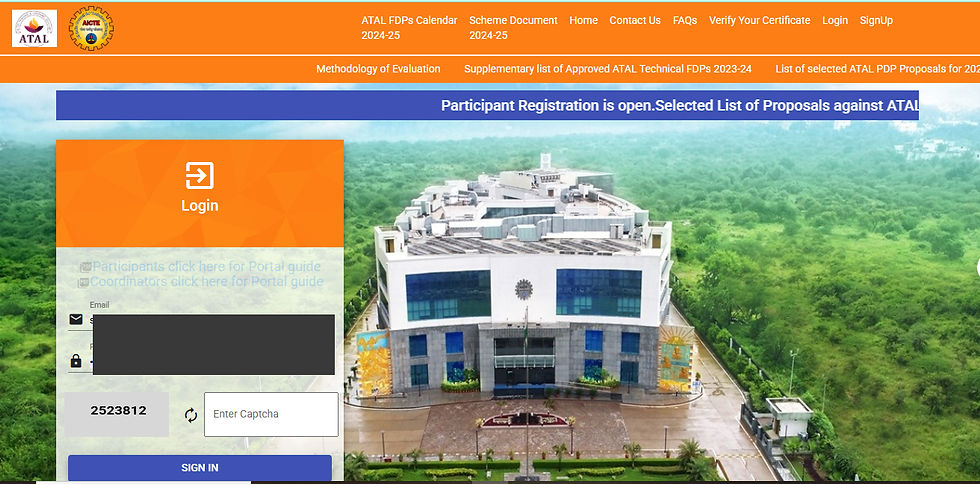
Step 1: Visit ATAL FDP Portal for
The ATAL FDP login serves as a vital entry point for participants engaged in the Faculty Development Programme (FDP) organized by the ATAL Academy. This platform aims to elevate the quality of technical education in India by equipping faculty members with the tools and resources necessary to refine their teaching methods and keep abreast of the latest developments in their fields. Through the ATAL FDP login, users gain access to a range of online courses, workshops, and training sessions designed to support professional growth and encourage innovative teaching practices. To log in successfully, users typically need to provide their credentials, including a registered email address and a password set during registration. Once logged in, participants can explore a wide array of resources, such as instructional materials, recorded lectures, and interactive forums for engaging with fellow educators and experts. The platform not only facilitates learning but also fosters collaboration and networking among faculty from various institutions nationwide. Additionally, the ATAL FDP login functions as a personalized dashboard, enabling users to track their progress in different courses, manage schedules, and receive updates on upcoming events and new offerings. This comprehensive approach ensures educators are well-prepared to tackle the challenges of modern education and effectively contribute to their students' academic growth. In summary, the ATAL FDP login is an essential component of the Faculty Development Programme, offering access to extensive knowledge and resources aimed at empowering educators and improving the overall quality of education in technical institutions.
Go to the official ATAL Academy website:🔗 https://atalacademy.aicte-india.org/
atal fdp login
Consent Letter for Atal FDP
Step 2: Login or Register for atal fdp login
If you already have an account, click on Login and enter your credentials.
If you are new, click on Register and provide the required details:
Name
Email ID
Mobile Number
Institute Name
Department
Password (set a strong password)
Once registered, log in using your credentials.
Step 3: Browse and Select an FDP after atal fdp login
After logging in, navigate to "FDPs" or "Upcoming FDPs" section.
Use filters to search by:
Subject Area (AI, Cybersecurity, Data Science, etc.)
Date
Mode (Online/Offline)
Host Institute
Click on the "Apply" button for your chosen FDP.

Step 4: Confirmation and Email Notification
Once you apply, you should get an email confirmation. This email confirms that your application has been successfully submitted and is being processed. Usually, the confirmation includes important information like your application reference number, which you can use for future inquiries about your application status. The email might also detail the next steps in the application process, including any timelines you should be aware of, such as when you can expect to hear back about your application's outcome. It's advisable to keep this confirmation email safe, as it may also contain contact information for customer support or the admissions office if you have any questions or need further assistance. If you don't receive your confirmation email within a specified timeframe, check your spam or junk folder, as automated emails can sometimes be misclassified. If it's still missing, contact the relevant department to ensure your application was received and to prevent any potential issues with your submission.
Certain Faculty Development Programs (FDPs) might employ a structured selection process to ensure participants meet specific criteria and have the necessary qualifications to benefit from the program. This process could involve several steps, including submitting an application that details your professional background, teaching philosophy, and objectives for joining the program. Additionally, some FDPs may require letters of recommendation from colleagues or supervisors who can vouch for your dedication to professional development and potential for growth. Once the selection process concludes, you will be informed about your application status, indicating whether you have been chosen to participate or not. This notification may arrive as an official email or letter, outlining any subsequent steps if you are selected, such as orientation sessions, program requirements, and important dates to note. It is crucial to monitor your communication channels during this period, as timely responses might be necessary to secure your place in the program.
Step 5: Attend the FDP
If it's an online FDP, login to your ATAL account to access the session links.
If it's an offline FDP, check the venue details in your email.
Step 6: Complete Assignments and Feedback
Some FDPs require quizzes, assignments, or attendance tracking.
At the end of the program, submit the feedback form to receive your certificate.
Step 7: Download Certificate
Once the FDP is completed, certificates can be downloaded from the ATAL portal under "My Certificates" section.

FAQs
How to Apply for Atal FDP?
To apply for the Atal Faculty Development Program (FDP), follow these steps:
Visit the Official Website: Go to the official website of the Atal FDP, usually hosted by AICTE or associated institutions.
Registration: Create an account by registering with your email and other required details. You may need to verify your email address.
Browse Available Programs: Navigate through the list of available FDPs to find the one that suits your interests and expertise.
Fill Application Form: Complete the application form for the selected FDP, providing all necessary information, including personal details, qualifications, and professional background.
Upload Required Documents: Attach any required documents, such as your CV, educational certificates, and any other specified materials.
Pay Application Fee: If applicable, pay the required application fee through the provided payment methods.
Submit Application: Review your application for accuracy and submit it. You will receive a confirmation of your application submission.
Wait for Confirmation: Keep an eye on your email for updates regarding the status of your application and any further instructions.
What is the Use of Atal FDP?
The Atal Faculty Development Program (FDP) serves several important purposes:
Skill Enhancement: It provides faculty members with advanced skills and knowledge in their respective fields, helping them stay updated with the latest developments.
Research Promotion: The program encourages research activities among faculty, fostering a culture of innovation and inquiry in educational institutions.
Networking Opportunities: Participants can connect with peers, industry experts, and academicians, facilitating collaboration and exchange of ideas.
Curriculum Development: It aids in the enhancement of curriculum design and teaching methodologies, improving the overall quality of education.
Career Advancement: Engaging in FDPs can enhance a faculty member's profile, potentially leading to better career opportunities and promotions.
What is Atal FDP on Blockchain?
The Atal FDP on Blockchain focuses on educating faculty members about blockchain technology, its applications, and implications in various sectors. Key aspects include:
Understanding Blockchain: Participants learn the fundamental concepts of blockchain, including its architecture, types, and functioning.
Applications of Blockchain: The program covers various use cases of blockchain technology across industries such as finance, healthcare, supply chain, and education.
Hands-on Training: Faculty members often engage in practical sessions that involve coding and implementing blockchain solutions.
Research and Development: The FDP encourages faculty to explore research opportunities in blockchain and its integration into academic curricula.
Industry Collaboration: Participants may interact with industry experts to understand real-world challenges and solutions related to blockchain.
What is the Faculty Development Program of AICTE?
The Faculty Development Program (FDP) initiated by the All India Council for Technical Education (AICTE) is designed to enhance the skills and knowledge of faculty members in technical institutions. Its main features include:
Objective: The primary aim is to improve teaching quality, research capabilities, and professional development of educators in technical fields.
Content Delivery: The program includes workshops, seminars, and training sessions on various subjects, methodologies, and technologies.
Eligibility: FDPs are typically open to faculty members from engineering, management, and other technical disciplines.
Duration: The duration of FDPs can vary, often ranging from a few days to several weeks, depending on the program's structure.
Certification: Participants usually receive a certificate upon successful completion of the program, which can enhance their professional credentials.
Understanding ATAL FDP Login
The ATAL FDP Login is an essential gateway for educators and participants involved in the ATAL (ATAL Academy) Faculty Development Program. This initiative aims to enhance the quality of technical education in India by providing various faculty development programs. In this blog, we will explore the significance of the ATAL FDP, the login process, and tips for a seamless experience.
What is ATAL FDP?
The ATAL Faculty Development Program (FDP) is an initiative by the All India Council for Technical Education (AICTE) to improve the quality of teaching in technical institutions. The program offers a range of workshops and training sessions designed to upskill faculty members across various disciplines.
Importance of ATAL FDP
Skill Enhancement: It provides educators with the latest teaching methodologies and technological advancements.
Networking Opportunities: Participants can connect with peers and experts in their field, fostering collaboration.
Certification: Successful completion of the program often results in certification, which can enhance career prospects.
How to Access ATAL FDP Login?
To access the ATAL FDP portal, follow these steps:
Visit the Official Website: Navigate to the official ATAL Academy website.
Locate the Login Section: Find the 'Login' button on the homepage.
Enter Credentials: Input your username and password. If you are a new user, you may need to register first.
Submit: Click the 'Login' button to access your dashboard.
Troubleshooting Common Login Issues
If you encounter difficulties during the ATAL FDP login process, consider the following solutions:
Forgot Password: Use the 'Forgot Password' link to reset your password.
Account Lock: If your account is locked, contact support for assistance.
Browser Issues: Ensure that your browser is updated and try clearing the cache.
Conclusion
The ATAL FDP login is a crucial step for educators looking to enhance their skills and contribute to the improvement of technical education in India. By following the outlined steps and tips, users can navigate the login process effectively and take full advantage of the resources available through the ATAL Academy.

$50
Product Title
Product Details goes here with the simple product description and more information can be seen by clicking the see more button. Product Details goes here with the simple product description and more information can be seen by clicking the see more button

$50
Product Title
Product Details goes here with the simple product description and more information can be seen by clicking the see more button. Product Details goes here with the simple product description and more information can be seen by clicking the see more button.
$50
Product Title
Product Details goes here with the simple product description and more information can be seen by clicking the see more button. Product Details goes here with the simple product description and more information can be seen by clicking the see more button.


Comments